


WiFi Smart Lock: 7 Smart Ways to Control Your Door From Anywhere in Egypt

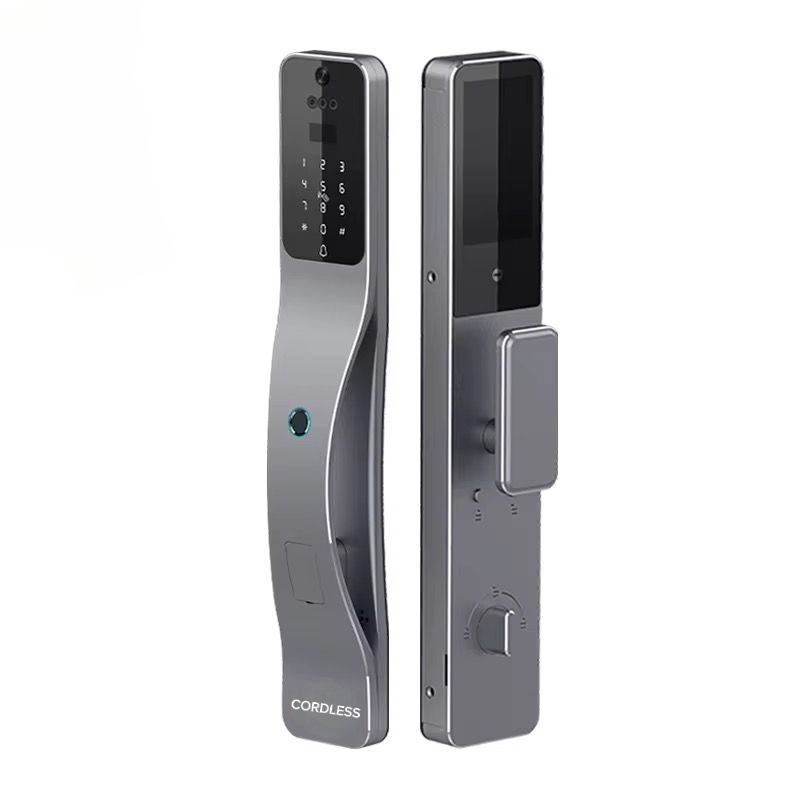
A WiFi smart lock lets you open your front door, see who is standing outside and send a one-time code to a guest, all from your phone and from anywhere you have internet. For families in Cairo, landlords managing apartments on the North Coast and anyone who is tired of copying keys for the doorman, the cleaner and the plumber, that remote control is the real upgrade. This guide explains how a WiFi smart lock works, what it needs from your home network, seven practical ways to use one in Egypt, and which Cordless models connect over WiFi, with honest notes on the limits.
Last updated: November 9, 2026 · By the Cordless smart lock team, Egypt
Quick answer: A WiFi smart lock connects to your home router and the Tuya Smart app, so you can unlock, get alerts and share access remotely without a separate hub. At Cordless, the WiFi models are CL-03 (listed at 14,300 EGP), CL-03 Matter with Apple HomeKit support (16,200 EGP) and CL-K2 with Alexa support (15,500 EGP). All three add 3D face recognition, fingerprint, PIN, card and a mechanical backup key, plus a camera with 2-way video call.
Key takeaways:
- WiFi gives you remote control from anywhere; Bluetooth only works within a few metres of the door.
- Most WiFi locks, including Tuya-based ones, connect on the 2.4 GHz band, so check your router before installation.
- Your door still opens with face, fingerprint, PIN, card or key if the internet goes down.
What Is a WiFi Smart Lock?
A WiFi smart lock is an electronic door lock with a built-in Wi-Fi module. Instead of talking only to a phone standing next to it, the lock joins your home network and reaches a cloud service. The app on your phone talks to that service, so a tap in Alexandria can open a door in New Cairo within seconds.
The lock itself still does everything a normal smart lock does: it reads your face or fingerprint, accepts a PIN or an RFID card, and keeps a mechanical key slot for emergencies. WiFi is the layer on top that turns it from a keyless lock into a connected one. If you are still choosing between lock styles, our guide to the types of smart locks compares them door by door.
How a WiFi Smart Lock Connects: WiFi vs Bluetooth vs Zigbee
Smart locks use three main ways to talk to your phone, and the difference matters more than most buyers expect.
- WiFi: connects straight to the router. Remote access works from anywhere with no extra device. It uses more power than the other two, so batteries need charging or replacing more often.
- Bluetooth: very low power, but your phone must be close to the door. Good for unlocking as you arrive, useless for letting someone in while you are at work.
- Zigbee: low power and stable, but it needs a hub such as the Cordless CL-ZHUB to bridge the lock to the internet. A good fit if you are building a full smart home with switches and curtains on the same system.
Some models also support Matter, the shared smart home standard that lets one device work with Apple Home, Google Home and Alexa at the same time.
7 Smart Ways to Use a WiFi Smart Lock in Egypt
1. Open the door for family and deliveries remotely
Your mother arrives before you get home, or a courier needs to drop a parcel inside the gate. With a WiFi smart lock, you get a notification, check the camera, and unlock from the app. No spare key under the mat.
2. Send temporary codes to guests, cleaners and technicians
Create a PIN that works only on Thursday from 10 am to 2 pm for the cleaner, or a one-time code for the AC technician. When the time window ends, the code stops working, and you never have to ask for a key back.
3. Get real-time alerts and a full access log
Every unlock is recorded with the method and the time: who used a fingerprint, which card was tapped, which code was entered. Parents use this to know when children are home from school; small offices use it instead of a paper sign-in sheet.
4. Talk to whoever is at the door
Models with a camera and 2-way video call act like a video intercom. You see and speak to the visitor through your phone, then decide whether to open. This is especially useful in villas and compounds where the door is far from the living area.
5. Add voice control and smart home scenes
Linked to Alexa, Google Home or Apple Home, the lock can become part of a routine: lock the door, switch off the lights and close the curtains with one “good night” command. Cordless smart switches and curtain controllers run on the same Tuya app.
6. Manage rental apartments without handing over keys
For short-term rentals in the Sahel, Gouna or downtown Cairo, a WiFi smart lock removes the key handover entirely. Each guest gets their own code for their stay only. We cover the full setup in our guide on a smart lock for rental property.
7. Get low-battery warnings before it matters
Because WiFi uses more power, the app warns you well before the battery runs out. Read our tips on smart lock battery life to stretch each charge as far as possible.
Cordless WiFi Smart Lock Models
These three Cordless models state Wi-Fi and Tuya Smart app support on their product pages. Prices are the listed prices on cord-less.com at the time of writing and can change, so check our smart lock price in Egypt guide for the latest comparison.
CL-03: WiFi smart lock with camera and 2-way video
CL-03 unlocks with 3D face recognition, fingerprint, PIN, magnetic card, mechanical key and the Tuya Smart app. Its built-in camera supports real-time 2-way video calls, and it suits wooden and armored doors. Listed at 14,300 EGP.
CL-03 Matter: the WiFi smart lock for Apple users
CL-03 Matter has the same unlocking methods and camera as CL-03, plus Matter protocol support so it appears in Apple HomeKit alongside other Matter platforms. Listed at 16,200 EGP.

CL-K2: WiFi smart lock with motion sensor and Alexa
CL-K2 adds a motion sensor, an internal screen that shows the camera image, and Alexa compatibility on top of face, fingerprint, PIN, card, key and app unlocking. Listed at 15,500 EGP.
| Model | Smart home | Camera & video call | Listed price |
|---|---|---|---|
| CL-03 | Tuya Smart app | Yes | 14,300 EGP |
| CL-03 Matter | Tuya + Matter + Apple HomeKit | Yes | 16,200 EGP |
| CL-K2 | Tuya + Alexa | Yes, with motion sensor | 15,500 EGP |
Before You Buy a WiFi Smart Lock: 4 Checks
- Router band: make sure your router broadcasts a 2.4 GHz network. Many routers combine 2.4 and 5 GHz under one name, which can confuse the first pairing.
- Signal at the door: stand at the front door and test your phone’s WiFi. If it is weak, add a mesh point or extender near the entrance before installation.
- Door type and thickness: wooden and armored doors suit the models above. Glass and aluminum doors need dedicated locks. Our smart lock installation guide explains what our team measures.
- Power backup: confirm how the lock is charged and that an emergency power port or mechanical key is available.
Is a WiFi Smart Lock Safe?
A WiFi smart lock is as secure as the accounts and network around it. Use a strong router password and WPA2 or WPA3 encryption, protect your Tuya account with a unique password, keep the app and lock firmware updated, and remove old codes and users you no longer need. If the internet or power fails, the lock does not open by itself; you still enter with face, fingerprint, PIN, card or the mechanical key.
WiFi Smart Lock FAQ
Does a WiFi smart lock work if the internet is down?
Yes. Remote features pause, but local methods such as face, fingerprint, PIN, card and key keep working.
Do I need a hub?
No. A WiFi smart lock connects directly to your router. A hub is only needed for Zigbee locks.
How many people can share access?
The Tuya app lets you add family members and create separate codes, cards and fingerprints for each user, so everyone has their own access you can remove at any time.
Choose Your WiFi Smart Lock With Cordless
If you want to open your door from anywhere, a WiFi smart lock is the simplest way to get there. Browse the full range in the Cordless shop, or contact our team in Egypt for a free recommendation and professional installation.