


Tuya Smart Lock: 7 Proven Steps to a Perfect App Setup in Egypt

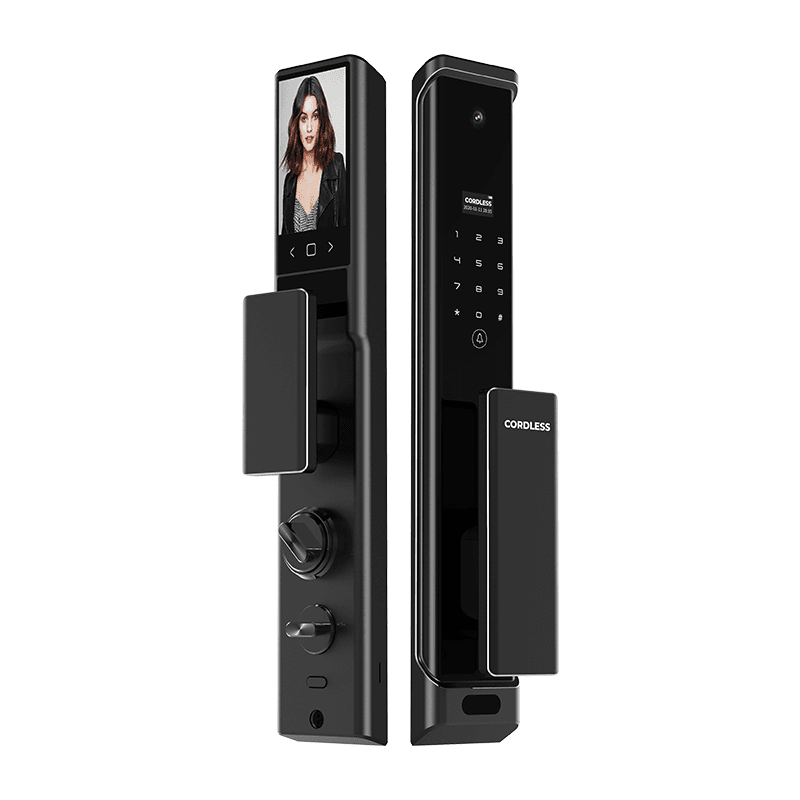
A Tuya smart lock is the most common type of app-controlled door lock in Egypt, and “tuya smart lock” is one of the top smart lock searches in the country on Google Trends. This guide explains what Tuya is, which Cordless locks use it, how to set up the app in 7 steps, and what you can and cannot do from your phone.
Last updated: November 12, 2026 · By the Cordless smart lock team, Egypt
Quick answer: A Tuya smart lock is a door lock you control with the free Tuya Smart app over Wi-Fi. In Egypt, Cordless sells Tuya-based models from EGP 8,300 (G-14 and CL-15) to EGP 14,300 for the CL-03 with camera and 2-way video, EGP 23,000 for the CL-MARS and EGP 28,000 for the full-automatic CL-S16, all listed prices at the time of writing.
Key takeaways:
- Tuya is a smart home platform; the Tuya Smart app controls locks, switches, curtains and more in one place.
- Fingerprint, PIN, card and key work at the door even when the internet is down.
- Remote unlocking, alerts and video calls need the lock online over Wi-Fi.
- You can share access with family and create temporary codes, depending on the model.
- Cordless app-lock prices start at EGP 8,300 at the time of writing.
What Is a Tuya Smart Lock?
A Tuya smart lock is an electronic door lock built on the Tuya IoT platform, so it can be paired with the Tuya Smart app and controlled from your phone. Tuya is a global smart home platform used by many manufacturers, which is why one app can run your lock, smart switches and curtain motors together.
Like any smart lock, a Tuya-based lock still has local unlocking methods at the door. The app adds remote control, sharing, notifications and an unlock history on top of fingerprint, PIN code, card and key.
Why Tuya Smart Lock Searches Are Growing in Egypt
Searches are growing because most affordable app-controlled locks sold in Egypt run on the Tuya platform. On Google Trends for Egypt, “tuya” and “tuya smart lock” are among the top queries related to “smart lock”, and “tuya smart door lock” is marked as a breakout search.
Egyptian buyers like Tuya for three practical reasons:
- One app for the whole home: the lock, smart circuit breakers and curtain controllers sit in the same app.
- Arabic and English interface: the app supports multiple languages, so every family member can use it.
- No monthly fee for basic lock features: remote unlocking and sharing work without a subscription.
Which Cordless Models Are Tuya Smart Lock Models?
Most Cordless door locks list Tuya Smart App control on their product pages. The right model depends on your door and on whether you want a camera.
Entry-Level Tuya Smart Lock: G-14 and CL-15
The G-14 (EGP 8,300) offers fingerprint, PIN, magnetic card, mechanical key and Tuya app control, powered by 4 × AA batteries, for wooden and armored doors. The CL-15 (EGP 8,300) offers the same five methods in a slim body made for aluminum doors.
Tuya Smart Lock With Camera: CL-03 and CL-STORM
The CL-03 (EGP 14,300) adds Wi-Fi, 3D face recognition, a built-in camera and 2-way video calls. The CL-STORM (EGP 15,800) adds palm vein recognition and works with Alexa.
Premium Models: CL-MARS and CL-S16
The CL-MARS (EGP 23,000) has an ultra-wide 2MP camera, Alexa support and a 5000mAh lithium battery. The CL-S16 (EGP 28,000) is full-automatic, with face and palm vein recognition, a 120°+ dual camera and security alerts in the Tuya Smart app.
Tuya Smart Lock Model Comparison
This table compares the Cordless app-controlled models using only the features and listed prices on each product page at the time of writing.
| Model | Unlocking methods | Camera / video call | Voice assistant | Listed price |
|---|---|---|---|---|
| G-14 | Fingerprint, PIN, card, key, Tuya app | No | Not listed | EGP 8,300 |
| CL-15 | Fingerprint, PIN, card, key, Tuya app | No | Not listed | EGP 8,300 |
| CL-03 | Face, fingerprint, PIN, card, key, Tuya app | Yes, 2-way video | Not listed | EGP 14,300 |
| CL-STORM | Face, palm vein, fingerprint, PIN, card, key, app | Yes, 2-way video | Alexa | EGP 15,800 |
| CL-MARS | Face, palm vein, fingerprint, PIN, card, key, app | Yes, 2MP ultra-wide | Alexa | EGP 23,000 |
| CL-S16 | Face, palm vein, fingerprint, PIN, NFC card, key, app | Yes, dual camera | Not listed | EGP 28,000 |
How to Set Up a Tuya Smart Lock in 7 Steps
Setting up the app takes about 10 minutes once the lock is installed. Menu names can differ slightly between app versions and lock models, so keep the lock manual close.
1. Download the Tuya Smart App
Install the free Tuya Smart app from Google Play or the App Store and create an account with your email or phone number.
2. Connect Your Phone to 2.4 GHz Wi-Fi
Most Wi-Fi smart home devices pair on the 2.4 GHz band. If your router broadcasts one combined name, ask your internet provider or installer how to use the 2.4 GHz network during pairing.
3. Register Yourself as the Admin
On the lock keypad, register your fingerprint or PIN first. The first user is usually the administrator, which protects the settings from anyone else.
4. Put the Lock in Pairing Mode
Enter the admin menu on the lock and choose the network or pairing option described in the manual. The lock will announce or display that it is ready to connect.
5. Add the Device in the App
Tap “+” in the Tuya Smart app, choose Add Device, then let the app scan or select the lock category. Enter your Wi-Fi password and wait for the confirmation.
6. Name the Lock and Assign a Room
Give the lock a clear name, such as “Main Door”, so voice assistants and family members find it easily.
7. Invite Family and Test Remote Unlocking
Add family members from Home Management, then test remote unlocking, notifications and the unlock record while you are standing next to the door.
What You Can Do With a Tuya Smart Lock App
The Tuya Smart app turns your phone into a control panel for the door. Depending on the model, you can:
- Unlock remotely for a family member or a delivery.
- Create temporary or one-time passwords for guests and technicians.
- See an unlock record showing who opened the door and when.
- Receive alerts such as low battery, wrong attempts or anti-pry warnings.
- Answer video calls from the door on camera models like the CL-03, CL-STORM and CL-MARS.
- Link the lock to Alexa on models that list Alexa support.
For more on remote control, read our WiFi smart lock guide.
5 Security Habits for Your Tuya Smart Lock Account
Your lock is only as safe as the phone account that controls it. These five habits keep your door under your control:
- Use a strong, unique password for your Tuya Smart account and never reuse your email password.
- Keep one admin: share access as a family member instead of giving out the owner login.
- Remove old users: delete former staff, tenants or drivers from the app and the lock on the same day.
- Update the app and your phone so you get the latest security fixes.
- Store the mechanical key safely outside the house, never under the doormat.
Our types of smart locks guide explains how each unlocking method compares on security.
Common Tuya Smart Lock Problems and Fixes
Most app problems come from the Wi-Fi connection, not the lock itself. These fixes solve the majority of cases:
- Pairing fails: move the phone close to the lock and confirm you are on 2.4 GHz Wi-Fi.
- Lock shows offline: check that the router signal reaches the door; a Wi-Fi extender near the entrance often helps.
- Notifications missing: allow notifications for the Tuya Smart app in your phone settings.
- Battery drains fast: frequent video calls and Wi-Fi use more power; see our smart lock battery life tips.
Frequently Asked Questions
Which Cordless models work as a Tuya smart lock?
Cordless lists Tuya Smart App control on many models, including the G-14 (EGP 8,300), CL-15 (EGP 8,300), CL-03 (EGP 14,300), CL-STORM (EGP 15,800), CL-MARS (EGP 23,000) and CL-S16 (EGP 28,000). Check the product page of the exact model, because features such as video calls and Alexa support differ between them.
How much does a Tuya smart lock cost in Egypt?
At the time of writing, Cordless app-lock prices start at EGP 8,300 for the G-14 and CL-15, go to EGP 14,300 for the CL-03 with camera and 2-way video, EGP 23,000 for the CL-MARS and EGP 28,000 for the full-automatic CL-S16. Prices can change, so confirm on the product page.
Does a Tuya smart lock work without internet?
Yes for local unlocking. Fingerprint, PIN code, card and the mechanical key work at the door without internet. Remote unlocking, live notifications and video calls through the Tuya Smart app need the lock to be online over Wi-Fi.
Can I share a Tuya smart lock with my family?
Yes. In the Tuya Smart app you can invite family members to your home so they control the lock from their own phones, and many models let you create temporary passwords for guests, cleaners or technicians. The exact options depend on the lock model.
Is the Tuya Smart app free?
The Tuya Smart app is free to download on Android and iPhone, and the basic lock functions such as remote unlocking, sharing and unlock records do not need a subscription. Some cloud services for cameras may be offered as optional paid add-ons, depending on the device.
Conclusion: Is a Tuya Smart Lock Right for You?
A Tuya smart lock is the easiest way to control your door from your phone in Egypt, with one free app for the lock and the rest of your smart home. Choose the G-14 or CL-15 for a budget setup, the CL-03 or CL-STORM for video calls, and the CL-MARS or CL-S16 for premium features.
Need help choosing or setting up the app? Browse every model in the Cordless shop and our team will help you pair it on installation day.